
ClipLesson 50 of 61
Set the Machining Method by Line Color (V-Groove, Pocket, Cut Through)
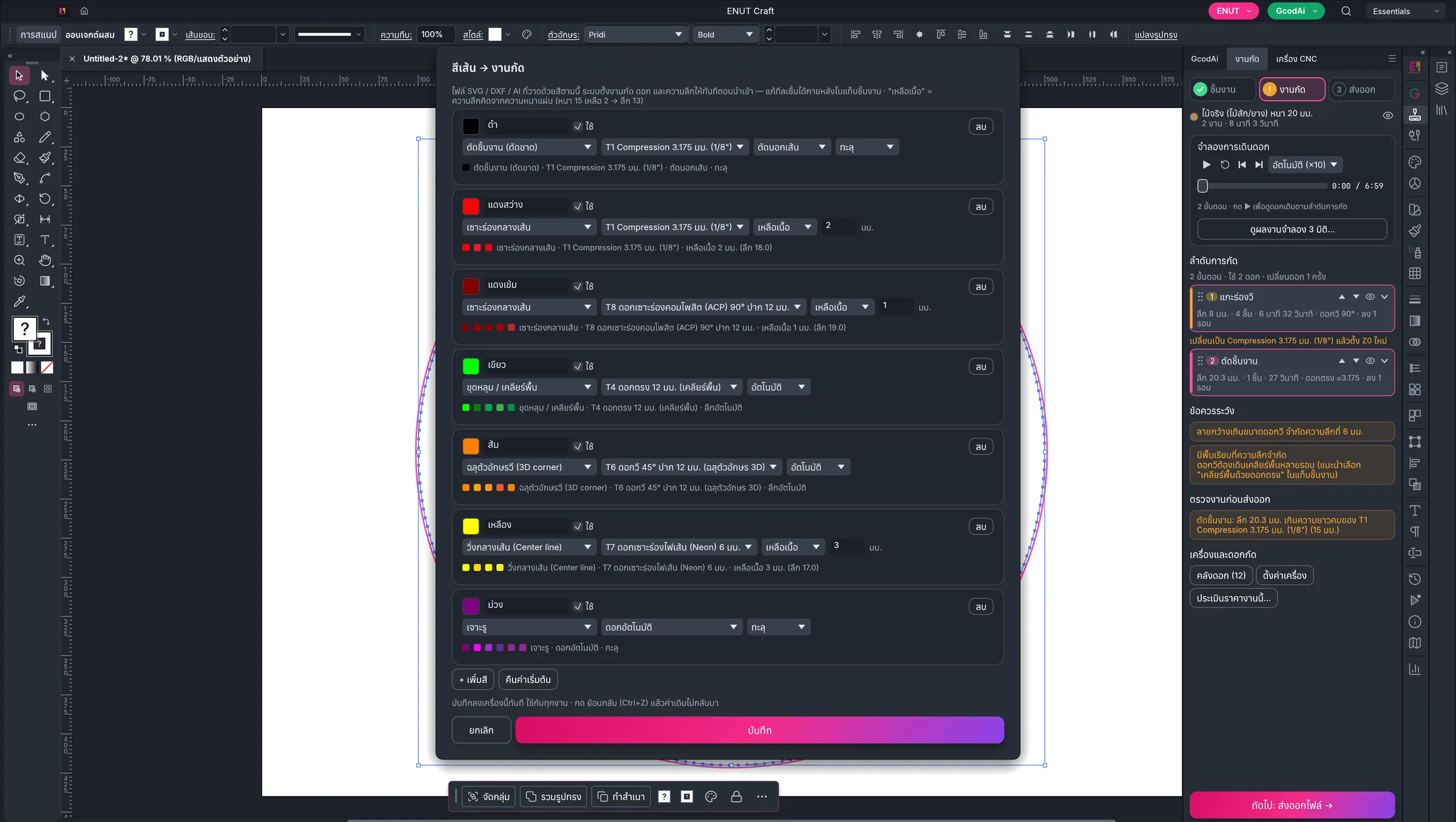
For each piece you can choose to cut it out, V-carve it, pocket it, cut a groove or drill a hole. Set this on the pieces tab, or set line color rules once under Line Colours → Machining…, and files you import later get their machining from the line colors automatically.
 Clip in progress
The clip for this lesson is being made. For now, follow the screenshots and steps below. The clip will appear here when it's ready.
Steps
Open GcodAi › CNC / CAM…, go to the Pieces tab, and click a piece
Under What Will This Piece Do?, choose Cut Out the Piece, V-Carve, Pocket, Groove Along the Line or Drill a Hole (or Let the Program Choose)
To set color rules: open the ≡ menu of the panel and choose Line Colours → Machining…
Click + Add, pick a color, then choose the machining, such as cutting the piece (cut through) or pocketing / clearing the floor, and choose the depth, such as through or leave some material
Click Save. SVG, DXF or AI files you import next time get their machining from the line colors. You can still change each piece later on the pieces tab